discrimintools.fviz_plsr_var#
- discrimintools.fviz_plsr_var(obj, axis=[0, 1], geom=('arrow', 'text'), repel=False, col_var='steelblue', segment_args={'alpha': 1, 'linetype': 'solid', 'size': 0.5}, text_args={'size': 8}, add_circle=True, col_circle='gray', x_lim=(-1.1, 1.1), y_lim=(-1.1, 1.1), x_label=None, y_label=None, title=None, add_hline=True, add_vline=True, add_grid=True, ggtheme=None)[source]#
-
Visualize Partial Least Squares Regression - Graph of variables
fviz_plsr_varprovides plotnine based elegant visualization ofCPLS,PLSDA,:class:~discrimintools.PLSLDA andPLSLOGIToutputs for variables.- Parameters:
-
obj (class) – An instance of class
CPLS,PLSDA,PLSLDAorPLSLOGIT.axis (list, defaul = [0,1]) – Dimensions to be plotted.
-
geom (str, list or tuple, default = (‘arrow’,’text’)) – Geometry to be used for the graph. Possible values are the combinaison of [“arrow”,”text”].
‘arrow’ to show only arrows,
‘text’ to show only labels,
(‘arrow’,’text’) to show both types.
repel (bool, default = False) – To avoid overplotting text labels.
col_var (str, default = ‘steelblue’) – Color for the variables segments and texts.
segments_args (dict, default = dict(linetype=”solid”,size=0.5,alpha=1)) – Keywords arguments for geom_segment.
text_args (dict, default = dict(size = 8)) – Keywords arguments for geom_text.
add_circle (bool, default = True) – To draw circle.
col_circle (str, default = “gray”) – Color for the circle.
x_lim (None, list or tuple, default = (-1.1,1.1)) – The range of the plotted
xvalues.y_lim (None, list or tuple, default = (-1.1,1.1)) – The range of the plotted
yvalues.x_label (None or str, default = None) – The label text of
x.y_label (None or str, default = None) – The label text of
y.title (None or str, default = None) – The title of the graph you draw.
add_hline (bool, default = True) – To add a horizontal line.
add_vline (bool, default = True) – To add a vertical line.
add_grid (bool, default = True) – To add grid customization.
ggtheme (function, default = None) – Plotnine theme name.
- Returns:
-
p – A object of class ggplot.
- Return type:
-
class
See also
fviz_plsr-
Visualize Partial Least Squares Regression (CPLS, PLSDA, PLSLDA, PLSLOGIT)
fviz_plsr_ind-
Visualize Partial Least Squares Regression (CPLS, PLSDA, PLSLDA, PLSLOGIT) - Graph of individuals.
fviz_dist-
Visualize distance between barycenter.
Examples
>>> from discrimintools.datasets import load_dataset
>>> from discrimintools import CPLS, fviz_plsr_var
>>> D = load_dataset("breast") # load traning data
>>> y, X = D["Class"], D.drop(columns=["Class"]) # split into X and y
>>> clf = CPLS()
>>> clf.fit(X,y)
CPLS()
>>> p = fviz_plsr_var(clf) # graph of variables
>>> print(p)
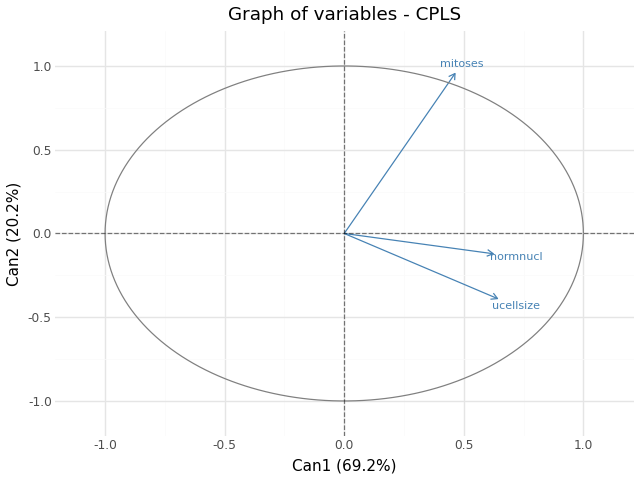
Fig. 21 Graph of variables - CPLS#